




| Description | Qty | Price | Amount |
|---|---|---|---|
| Website redesign, 6 pages | 1 | $2,400.00 | $2,400.00 |
| Hosting setup and launch | 1 | $150.00 | $150.00 |
- Subtotal
- $2,550.00
- Amount due (USD)
- $2,550.00
Free · no sign-up
Six layouts, each built for a kind of work. Pick one, fill it in online and download it as a PDF, free and without signing up.
Pick a layout, fill it in, download the PDF
For any business: clean, quiet and easy to read. It works for a one-off job, a product or a monthly fee.
Columns: Description · Qty · Price
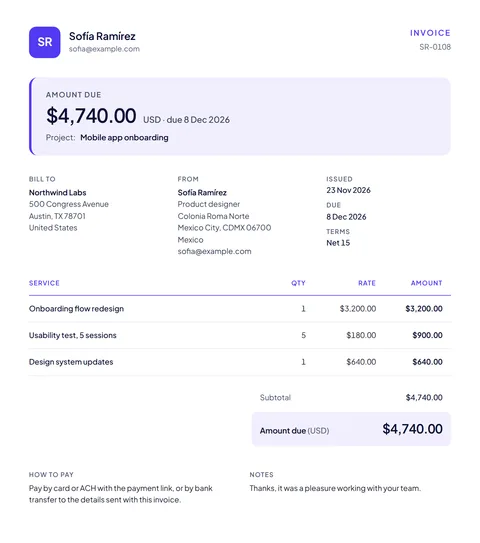
For freelancers billing clients abroad: the amount due up top. A busy client sees what to pay and by when.
Columns: Service · Qty · Rate
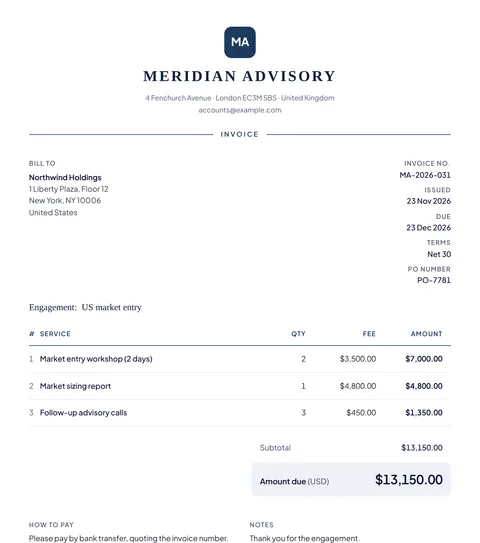
For consultants and advisers: formal, with the engagement and PO. Their finance team can match it to the order.
Columns: Service · Qty · Fee
For time-based work: hours × rate, with the total hours. Quarter hours are fine (7.25).
Columns: Work · Hours · Rate / hour
For trades and contractors: labor, materials and the job site. Tax on the total when you add a rate.
Columns: Labor and materials · Qty · Unit price
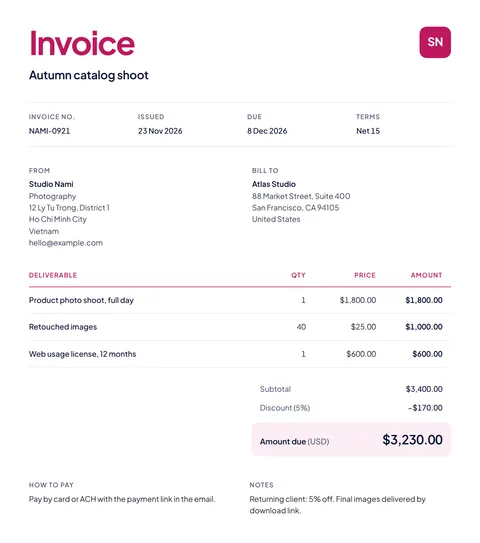
For designers and photographers: bold, with the project up front. A returning-client discount shows as its own line.
Columns: Deliverable · Qty · Price
Each layout also comes as a blank printable invoice template, in US Letter and A4, with lines to fill in by hand: your details, your client's, ten item rows and the totals.
Open a template, type over the example and click Download PDF. Your browser's print window opens: choose Save as PDF. The file is named after the invoice number and your client.
Long invoices run onto more pages with the column names repeated, and nothing you type leaves your browser.
Get paid online
A PDF can't take a payment by itself. Send an invoice from Vezmo by email, with a PDF, and your client pays it online by card, ACH, Apple Pay or Google Pay. You see when it's paid.
Starting rates, confirmed when we approve your account; +1% for cards issued outside the US. On a $4,740.00 invoice paid by card, Vezmo's fee is $132.54.
More in the Help center.
Yes, all six. Fill one in online and download it as a PDF, or print a blank one to fill in by hand; there's no sign-up and no watermark.
As a PDF, two ways: fill a template in online and click Download PDF, or download its blank printable PDF (US Letter or A4) to fill in by hand. There's no Word or Excel file; the online template does the sums for you and keeps the layout exact.
Simple suits most businesses. Freelance puts the amount due first; Consulting adds the engagement and a PO number; Hourly bills hours × rate and totals the hours; Contractor carries a job site and work order; Creative leads with the project for designers and photographers.
Yes. Switching keeps everything you typed and changes only the layout and the column names.
Your name and contact details, your client's, an invoice number, the issue date and due date, each item with its quantity, rate and amount, any discount and tax, the total, and how to pay.
What to include on an invoiceA PDF can't take a payment by itself. To get paid online, send the invoice from Vezmo: your client pays it by card, ACH, Apple Pay or Google Pay, and you see when it's paid. Card payments start at 2.79% + $0.29, and invoices are unlimited on every plan.
Invoicing and paymentsNo. Vezmo is a financial technology company, not a bank. Banking and card services are provided by regulated partners and banks.
Read next
Vezmo is a financial technology company, not a bank. Banking and card services are provided by regulated partners and banks.
One platform, worldwide
Payments today; accounts, cards and worldwide payouts in early access. One platform for your business.