Fees on sends and conversions
How the fee on a payment from your Vezmo account is worked out, the conversion fee when the currency changes, the US transfers your plan includes each month, how you see the exact fee before you send, and what comes back when a payment doesn't go through or is returned.
Overview
Every payment from your Vezmo account costs your plan's price for the way it goes: a US transfer by ACH, a domestic wire, an international transfer by SWIFT, or a payment in the recipient's own currency. When the money changes currency, a conversion fee is added on its own line. You see the exact fee before you confirm, and what you confirm is what you pay.
How the fee is worked out
The fee depends on two things: your plan, and how the payment reaches the person you pay.
| How it goes | Free | Grow | Pro |
|---|---|---|---|
| To a US account (ACH) | $5 | 9 a month included, then $1 | 30 a month included, then $1 |
| A domestic wire | $30 | $20 | $15 |
| US dollars abroad (SWIFT) | $39 | $35 | $25 |
| In the recipient's own currency | $9 + conversion | $6 + conversion | $5 + conversion |
| In the recipient's own currency, by SWIFT | $25 + conversion | $20 + conversion | $15 + conversion |
| Currency conversion | 1.0% | 0.7% | 0.5% |
| Turning dollars into stablecoin | 1.3% | 1.1% | 0.9% |
Prices are in US dollars, as on Pricing. If your business has a price agreed with us, that price is used instead, and it shows on Plan & billing.
- One fee for the transfer. The quote shows a single Fee: the whole price of the transfer, nothing added later.
- The conversion fee is a percent of what is converted, shown as Conversion fee (1%) with the rate, then the Total fees. Nothing is converted when dollars go to a dollar account, so there is no conversion fee then.
- Paying from another currency. The fees are in US dollars. When you pay from your EUR, GBP or AED balance, they are taken in that currency at the day's rate, and the quote shows them in that currency.
- "You send exactly". When you type what you want to send instead of what they receive, the fees come out of that amount, so the total is exactly what you typed.
Included US transfers
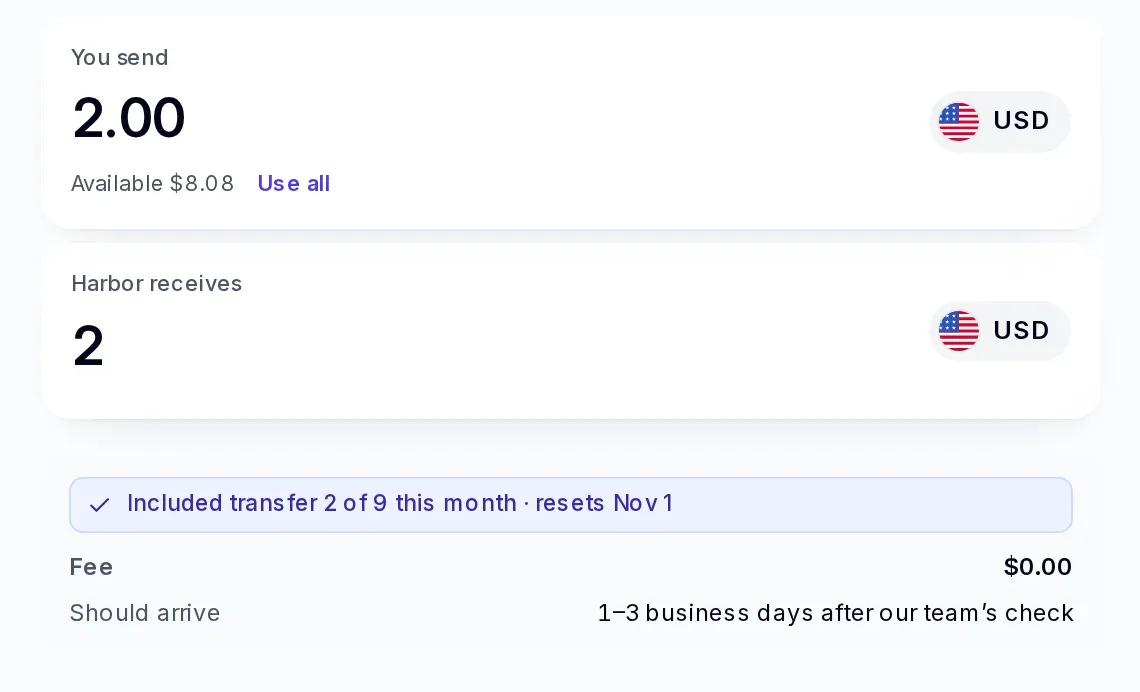
Grow includes 9 US transfers by ACH a calendar month, and Pro includes 30. While you have some left, a US ACH transfer costs nothing, and the quote says which one it is: Included transfer 3 of 9 this month · resets Dec 1.
- The count starts again on the 1st of each month (UTC).
- A transfer uses one when you confirm it. If it is not made, or our team doesn't approve it, you get it back.
- A payment that is returned after it was sent keeps its included transfer, as it keeps its fee.
- Wires, SWIFT and local-currency payments are never included.
You see it before you send
- In Accounts → Send, choose who you're paying and enter an amount.
- The fee, the conversion fee and the rate appear under the amount, with Price held for a few minutes.
- Continue shows what you pay in all. Confirming charges exactly that.
The details you give for a new recipient depend on their country and the way the money goes, and the form asks for exactly those. For example, a local payment to a bank in Mexico in MXN needs the recipient's 18-digit CLABE, and its last digit is checked when you save; a local payment to a bank in Kenya in KES needs the bank's SWIFT/BIC code, the branch code and the recipient's address.
If the price runs out before you confirm, change the amount to get a fresh one. A payment that waits for our team is charged the price you confirmed, whenever it goes.
Sending can be paused for a while. Send and Convert then say "Sending money is paused for a moment" before you fill anything in, and no price is shown. Your balance and money coming in aren't affected; try again later.
If a payment doesn't go through, or comes back
Now and then a payment stops after its money has left your balance, or the recipient's bank sends it back. While the money makes its way back to you, the payment shows Coming back in your activity, with a line that says what happened, for example "It didn't go through. We're getting the money back to your balance." You don't need to do anything.
Once the money is back in your balance:
| What happened | What comes back | The payment then shows |
|---|---|---|
| It didn't go through (it never reached the recipient) | The whole amount, fees included. An included transfer it used is given back. | Failed |
| It came back after it was paid (the recipient's bank returned it) | The amount sent. The fees stay, as the payment was made. | Returned |
- If charges were taken on the way back, the payment says how much came back, for example "It came back, less charges taken on the way: USD 95.00 is back in your balance."
- We tell you when the money is back, by email and in the app (the Accounts kind in Settings › Notifications).
- If our team needs to look into a payment, it says "Our team is checking this payment and will be in touch about its money."
Money that arrives
Stablecoin that is turned into US dollars as it arrives pays your plan's stablecoin conversion rate (1.3%, 1.1% or 0.9%), shown as Conversion fee on the payment. What else arriving costs is on Pricing.
Every payment's details and its receipt show the same single fee, and the conversion fee when there is one.
Questions
Why don't I see a separate Vezmo fee any more?
Your plan's price is the whole price of the transfer, so the quote shows it as one fee. Payments made before this change keep the two lines they were priced with.
Can a fee change after I confirm?
No. The fee you confirmed is the fee you pay, even if prices change before the payment goes.
Where do I see my prices?
On Plan & billing, with every fee your plan sets for your business. See Plans and billing.
Facts checked against the product on 6 Nov 2026.
Was this page helpful?