Webhooks
Get a signed event on your server when something happens in your business, covering adding an endpoint, all 43 events by product, the envelope and payloads, checking the signature, replies and retries, the automatic switch-off, the delivery log, catching up on missed events and changing the signing secret.
Overview
A webhook tells your server what happened, as it happens: a payment succeeded, a refund went through, a dispute opened,
an invoice was paid. You add an https endpoint once, pick the events it should get, and Vezmo sends each one as a signed
JSON POST.
Webhooks are how you ship orders: a redirect or a browser event can be faked, a signed event can't.
Add an endpoint
You need the webhooks permissions; the Manager role has them.
Open Webhooks
Go to Payments › VezmoPay, then Developers, and open the Webhooks tab. Select Add endpoint.
Enter the endpoint URL
The Endpoint URL must start with
https://, in test and in live. Addresses that point to a private network are refused, and we never follow redirects. To receive events on your own computer, use an https tunnel.Select the events
Under Select Events, tick each event you want. Search narrows the list, and Select all ticks every event. An endpoint only gets the events ticked here:
payment.successdoesn't bringpayment.failedwith it.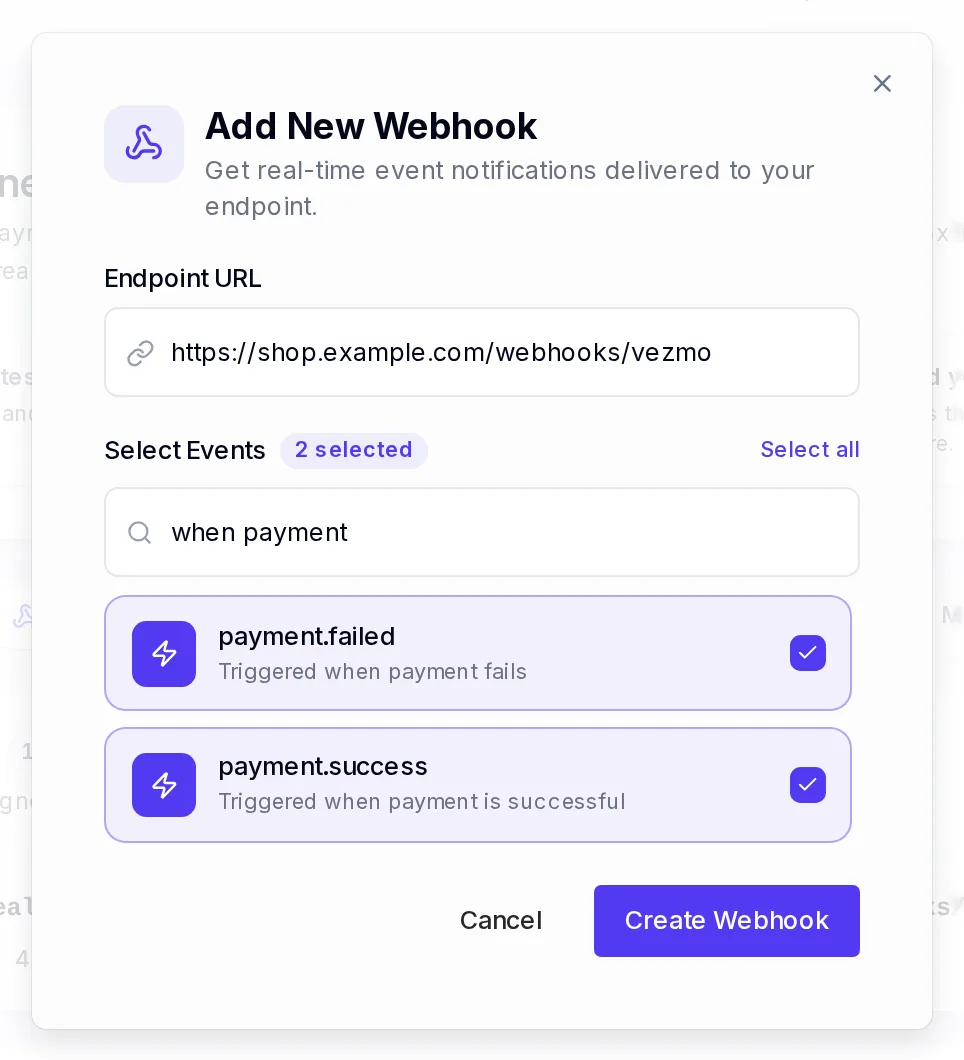
A new endpoint with two events ticked. Confirm with the emailed code
Select Create Webhook. We email you a 6-digit code: type it in. Adding an endpoint, or changing its URL or events, always needs one.
Save the signing secret
The Signing secret (
whsec_and 64 characters) is shown once. Store it on your server, then select I've saved it — done. You need it to check every event.
Endpoints belong to your business, not to the teammate who added them: they keep working when that person leaves, and everyone with webhook access sees and manages them. One endpoint gets both test and live events.


Events
There are 43 events. Payloads that aren't shown here are in the webhooks reference and on each product's reference page.
Payments
| Event | When it is sent |
|---|---|
payment.success | A payment succeeded: a card or wallet payment at once, a bank payment when it settles. method says how it was paid. |
payment.processing | A payment is on its way, like a US bank payment that is settling. payment.success follows when it settles, usually a few business days later. |
payment.awaiting_verification | A bank payment entered by hand waits for the customer to confirm small test deposits. It carries a verification block with the link to share. |
payment.failed | A payment was declined or failed, or a bank payment was returned. It carries the decline details. |
payment.canceled | A bank payment still on its way was canceled before the debit went out. No money moved. |
payment.refunded | A refund went through, in full or in part. Each refund is its own event. |
payment.refund_failed | A refund couldn't be completed. The amount is back in your balance; pay the customer back another way. |
payment_method.saved | A customer saved their card at checkout for later payments with you. |
Disputes
| Event | When it is sent |
|---|---|
dispute.created | A customer disputed a payment (a chargeback or an inquiry). It carries the reason and evidenceDueBy. |
dispute.updated | The dispute's status changed, for example when evidence was submitted. Each change is its own event. |
dispute.closed | The dispute reached its final status: won, lost or closed. |
Payouts
| Event | When it is sent |
|---|---|
payout.paid | A payout reached your bank. |
payout.failed | A payout failed. A bank can return a payout days after it was paid: the same payout then sends payout.failed after payout.paid. Keep the latest. |
Invoices
| Event | When it is sent |
|---|---|
invoice.created | An invoice was created. |
invoice.sent | An invoice was sent to the client. |
invoice.paid | An invoice was paid: by the client at checkout, or when a bank payment settled. |
invoice.cancelled | You canceled an invoice. |
Proposals
| Event | When it is sent |
|---|---|
proposal.sent | A proposal was sent. |
proposal.accepted | A proposal was accepted: by the client from the link (acceptedBy: "client"), or recorded by you with POST /merchant/proposal/:id/mark-accepted ("business"). |
proposal.rejected | A proposal was rejected: by the client, or recorded by you with POST /merchant/proposal/:id/mark-rejected (rejectedBy). |
Subscriptions
| Event | When it is sent |
|---|---|
subscription.trial_started | A free trial started: the customer saved their card. Nothing is charged yet. |
subscription.activated | The first payment succeeded. |
subscription.renewed | A renewal was paid. |
subscription.payment_failed | A subscription charge failed. Each failed attempt is its own event. |
subscription.updated | The quantity or the plan changed. |
subscription.paused | The subscription was paused. |
subscription.resumed | A paused subscription started again. |
subscription.cancel_scheduled | A cancel was booked for the end of the period, by you or the customer. It stays active until then. |
subscription.canceled | The subscription ended: canceled now, at the end of the period, or because its first payment was never made. |
subscription.refunded | A subscription payment was refunded, in full or in part. |
subscription.disputed | A subscription payment was disputed, or its dispute was won or lost. |
Agreements
Agreements have no test mode: their events always carry livemode: true.
| Event | When it is sent |
|---|---|
agreement.sent | An agreement was sent for signature. |
agreement.viewed | A recipient opened it for the first time. Once per recipient. |
agreement.signed | A recipient signed. Once per recipient. |
agreement.completed | Everyone signed and the signed PDF is ready. |
agreement.declined | A recipient declined to sign. |
agreement.voided | The agreement was voided. |
agreement.expired | Its deadline passed with someone still to sign. |
agreement.paid | The payment attached to it was paid. |
agreement.identity_checked | A signer's ID check passed, needs your review, was approved or rejected, or failed for the last time. |
agreement.awaiting_approval | Everyone signed, and it waits for you to approve the signers' IDs. |
Identity checks
| Event | When it is sent |
|---|---|
kyc.verification.submitted | A teammate's identity check went into review. |
kyc.verification.decided | A teammate's identity check was approved or rejected. |
These two carry only the check's id, userId, status, documentType, submittedAt and decidedAt (and your
merchantId): never a score or a reason.
What we send
Every event is a POST with a JSON body and these headers:
| Header | What it holds |
|---|---|
X-Webhook-Signature-V2 | The signature to check: see Check the signature. |
X-Webhook-Timestamp | When this attempt was sent, in Unix seconds. It is new on every retry. |
X-Webhook-Event | The event name, like payment.success. |
X-Webhook-Signature | An older signature over the body only, kept for integrations that already check it. New code checks V2. |
Content-Type | application/json |
The body is always the same envelope, with three fields. A full example of every event is in the Webhooks reference.
- id
- The event's id. The same on every retry of this event, and different for every other event: use it to spot repeats. Don't parse it.
- event
- The event name, as in the header.
- data
- The object the event is about. In
payment.successandpayment.failed,paymentIdis the id you got when you created the checkout session, besideamount,currency,status,methodandlivemode. Apayment.successexample is in the quickstart.
- Amounts are JSON numbers in major units:
49.99is $49.99. livemodeisfalsefor test events. Never ship a real order on one.merchantIdis your VezmoPay merchant id, once your business is approved.- When a customer paid in their own currency,
amountandcurrencyare your price, andchargedholds what they paid. See Local currency.
Check the signature
Check every event before you trust it. The X-Webhook-Signature-V2 header is the HMAC-SHA256 of
timestamp + "." + raw body, keyed with your signing secret, as lowercase hex. timestamp is the
X-Webhook-Timestamp header, exactly as sent.
- Read the raw body bytes. Parsing the JSON and turning it back into text changes it, and the signature won't match.
- Compute the HMAC and compare it to the header in constant time.
- Refuse a timestamp more than 5 minutes from your clock, so an old event can't be replayed.
Answer 400 to a bad signature and 200 to a good one. A working example, with the raw body, the 5-minute check and
the constant-time comparison, is in Verify signatures in the API
reference.
Replies and retries
Answer with any 2xx status within 5 seconds: the 5 seconds cover connecting and your reply. We read only the first
2 KB of what you send back. Anything else (another status, a timeout, a redirect) is a failed delivery.
A failed event is tried again, 4 attempts in all: at once, then 6 hours after the first failure, 12 hours after the
second and 24 hours after the third. Each attempt has a new timestamp and signature, and the same id. A retry goes to
the endpoint's URL at that moment, signed with its secret at that moment, so once you fix your endpoint the pending
retries land.
To stay inside 5 seconds, save the event and answer first, then do the slow work.
When an endpoint keeps failing
If every delivery to an endpoint fails for at least 3 days and at least 50 attempts, we switch it off: it shows as Disabled, and your team gets an email, "We paused one of your webhook endpoints". Its pending retries are dropped, and events that happen while it is off aren't kept for it.
The dashboard has no switch to turn a paused endpoint back on. Fix your server, delete the endpoint and add it again (you get a new signing secret), then catch up on what you missed.
Handle events well
- Expect repeats. The same event can arrive more than once. Keep the
ids you've handled and skip one you've seen. Each refund, each dispute status, each failed subscription charge and each agreement signer has its ownid. - Don't count on the order. A retry can arrive hours after a later event. Before you act on an old one, read the
current state from the API, for example
GET /merchant/payment/:id. - Check
livemode. Test and live events reach the same endpoint. - Match the money. Before you ship, check that
data.amountanddata.currencyare what the order expects.
The delivery log
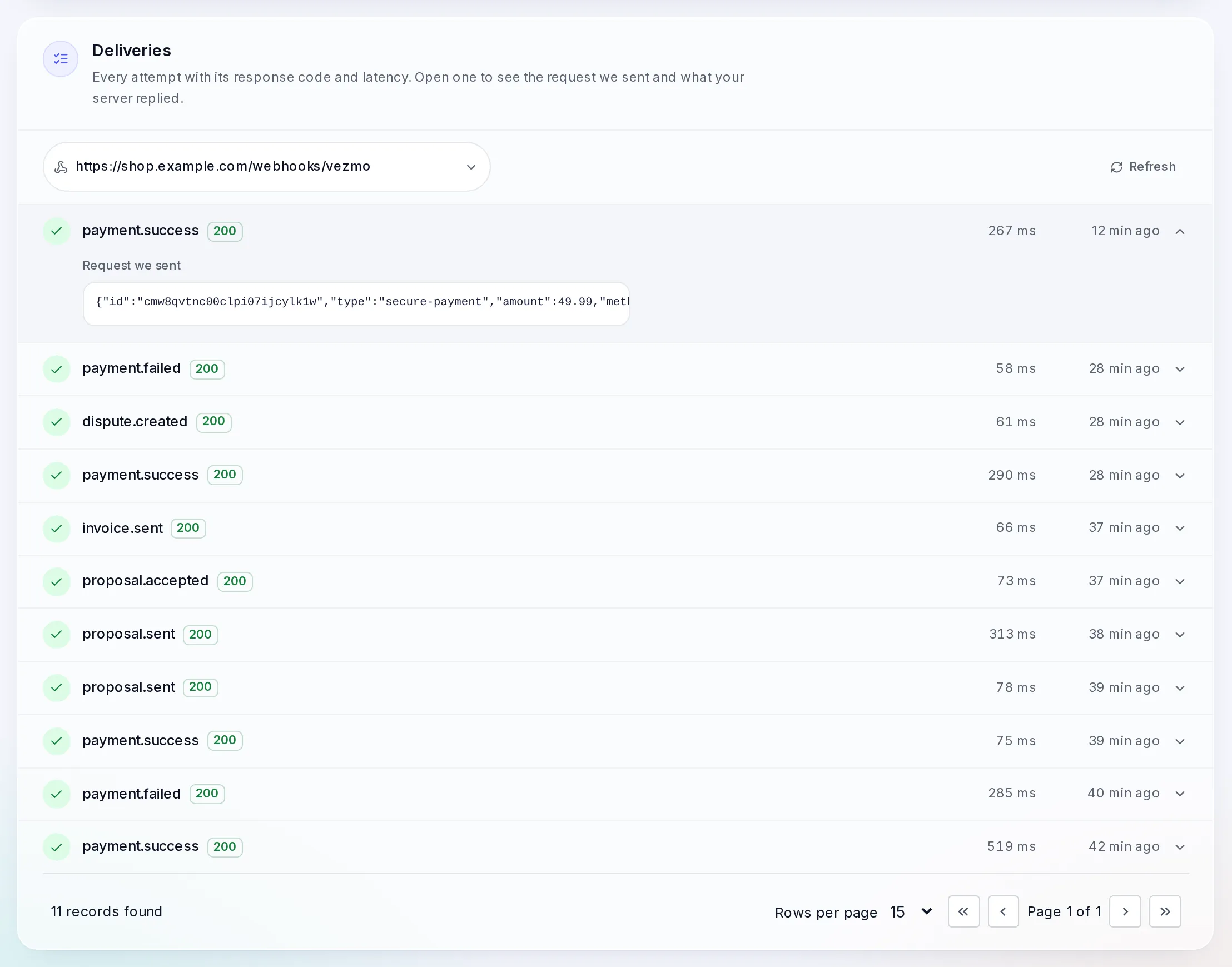
Developers › Webhooks › Deliveries lists every attempt: the event, your server's answer code, how long it took and when. It shows one endpoint at a time: choose it in the list at the top, or select Deliveries on its row. Open a row to see the request we sent and what your server replied.
- A row with
4xxor5xx: we delivered and your server refused it. A bad signature check is the usual cause. - No reply: your server didn't answer within 5 seconds, or couldn't be reached.
- No row at all: the endpoint isn't subscribed to that event, or the endpoint is off.
Catch up on missed events
There is no button to resend an event, no test event, and no API to list past events. To catch up after an outage, read the current state from the API (Payments reference):
-
Orders waiting for payment. For each one, read the payment id you saved with
GET /merchant/payment/:id, and act on itsstate. -
Payments you have no record of. List the days you missed with
GET /merchant/payment, usingrange=custom,startDateandendDate, and followdata.pagination.nextPageto the end.Bank payments still settling aren't in that list: list them with
pending=true, and those waiting for the customer's deposit check withstate=awaiting_verification. These two lists page withpage=. -
Disputes.
GET /merchant/dispute?from=2026-11-08&to=2026-11-09(reference). -
Invoices and subscriptions.
GET /merchant/invoiceandGET /merchant/subscription(invoices, subscriptions).
Change the signing secret
A secret can't be changed in place: editing an endpoint keeps it. To get a new one, add a new endpoint and delete the old one.
- Delete, then add the same URL: the simplest, but events in between are missed. Catch up as above.
- Add, then delete: no gap. While both endpoints exist, each event goes to both, with a different
idand each signed with its own endpoint's secret. For that time your handler has to accept both secrets, and spot repeats by the event name and the object indata(likedata.paymentId), not byid.
If a secret leaks, do it at once.
Questions
How do I send a test event?
Make a test payment with a test key: see Take your first test payment. Its events reach
your endpoint with livemode: false.
Can I add endpoints over the API?
No. Endpoints, like API keys, are managed in the dashboard only.
I get events for things a teammate did
Endpoints belong to the business, so they get events from the whole business, whoever caused them.
Related
Facts checked against the product on 9 Nov 2026.
Was this page helpful?
Hosted checkout
Take a payment on a checkout page Vezmo hosts for you, with one server call and a redirect, covering the session fields, the customer details, expiry, theme, success and cancel redirects, app return links, your order number and Idempotency-Key, fulfilling from the webhook and the session limit.
Go-live checklist
What to check before your integration takes real payments, covering approval and a live key, the key's expiry date, https redirects, trusted origins, a subscribed and verified webhook endpoint, branching on livemode, mobile app registration and a small live test.