Test mode for developers
How a test key runs your integration in the sandbox on the same base URL, how test and live data stay apart, the livemode flag, emails in test mode, what isn't simulated, and test values for cards, 3D Secure, declines, disputes and bank payments.
Overview
Test mode is a sandbox beside your live business. With a test key, your whole integration runs there: checkout sessions, the checkout page, payments, refunds, disputes and webhooks behave like live, and no real money moves. Test keys work before your business is approved, so you can build while it is reviewed.
To see your test data in the dashboard, turn on the Test mode switch in VezmoPay: Test mode and live mode explains the switch and what your customers see.
The key picks the mode
-
One base URL. Test and live calls both go to
https://api.vezmo.com/api/v1. There is no test URL, flag or header: a test key makes test objects, a live key live ones. -
Test data stays in test. A test key sees only test objects, and a live key only live ones. Asking for an object of the other mode answers
404, and the message says so, for example "a similar object exists in live mode, but a test mode key was used to make this request". -
livemodeon everything that moves money. Every payment and every payment event carrieslivemode:falsein test,truein live. Check it before you ship an order. -
A rate limit per key. A test key allows 25 requests a second by default, a live key 100. See Rate limits.
Payment links, invoices and proposals you make with a test key are test ones too, and their events carry
livemode: false. The ones you make in the dashboard are always live.
What test mode covers
| Works like live | Not in test mode |
|---|---|
| Checkout sessions, the hosted and embedded checkout and card fields | Payouts. Test payments build up a balance, but nothing is paid out to a bank. |
| Cards, 3D Secure, declines and bank payments, with the test values below | Agreements. They have no test mode. A test key can make drafts only; agreement events always carry livemode: true. |
| Refunds and disputes | |
Webhooks, with livemode: false |
One webhook endpoint receives both test and live events, signed with the same secret. Your handler tells them apart by
livemode.
Emails in test mode
Emails about test objects (invoices, proposals, receipts, subscriptions) go only to the addresses of your business's team. Any other address, such as a customer's, is skipped. Use a teammate's address when you want to see one.
The bank verification email is the exception: it goes to the address entered at checkout. In a test bank payment, use an address of your own.
Test cards
Use any future expiry date, any security code and any ZIP code.
| Card number | What happens |
|---|---|
4242 4242 4242 4242 | The payment succeeds. |
4000 0000 0000 3220 | The bank asks for 3D Secure. Complete the test challenge and the payment succeeds. |
4000 0000 0000 3055 | 3D Secure without a challenge. |
4000 0000 0000 0002 | Declined. payment.failed carries declineCode: "generic_decline". |
4000 0000 0000 9995 | Declined for insufficient funds. |
4000 0000 0000 0259 | The payment succeeds, then is disputed as fraudulent. dispute.created usually follows within seconds; allow up to 10 minutes. |
A declined test payment sends payment.failed with the same decline details as a live one: reason, declineCode,
and a decline object with its message, category, source and whether a retry may work (retriable). See
Webhooks in the API reference.
To answer a test dispute, submit evidence on it in the dashboard with Test mode on: you then receive
dispute.updated. See Disputes in the API reference.
Test bank payments (ACH)
In a test checkout, choose Bank, then enter the account details by hand.
| Details | What happens |
|---|---|
Routing 110000000, account 000123456789 | The payment waits for bank verification (payment.awaiting_verification). |
Deposit amounts 32 and 45 | Verifies the bank: the payment moves to processing, then succeeds. |
Routing 110000000, account 000555555559 | The payment succeeds, then is disputed and lost (dispute.created, then dispute.closed). |
The verification email and the verify page work as in live. See Bank payments in the API reference.
In the dashboard
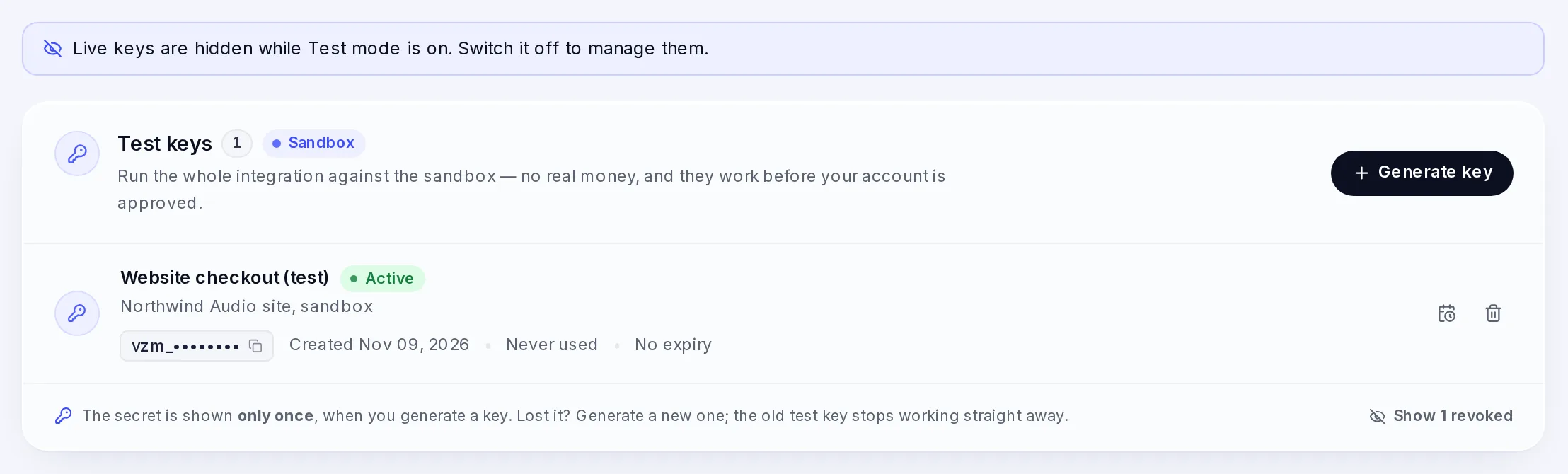
Once VezmoPay is approved for your business, Developers › API keys shows only your test keys while Test mode is on.
Go live
Swap the test key for a live key. Nothing else changes in your code: same base URL, same calls, same webhook endpoint. The Go-live checklist lists what to check first.
Questions
My test payment doesn't show in VezmoPay
Turn on Test mode in VezmoPay. The switch is kept per browser, so a teammate or another browser may still show live data.
Do I need a separate webhook endpoint for test events?
No. The same endpoint receives both. Check livemode in each event.
Can I test a payout?
No. Payouts happen in live mode only.
Related
- Test mode and live mode: the dashboard switch.
- API keys and access tokens
- Take your first test payment
- Go-live checklist
Facts checked against the product on 9 Nov 2026.
Was this page helpful?
API keys and access tokens
Test and live API keys, generating a key with the emailed code, the expiry date, one active key per teammate per mode, replacing and revoking keys, permissions, access and refresh tokens, sign-in limits and what each 401 or 403 means.
Choose how to take payments
Compare hosted checkout, embedded checkout, card fields, payment links, invoices, mobile apps and the WooCommerce plugin by the front-end work they need, what your customer sees, the payment methods they offer and how you learn the result.